🔵 TACTICS
GENERAL INFORMATION
Tactics must be submitted at least two hours before the next match. If there are less than two hours before the next match, you cannot change your tactics. See the timer in the tactics page and/or the kick-off time.

SETTING YOUR TACTICS
You might know how this works from any football manager game you may have played, but here is a short rundown nonetheless.
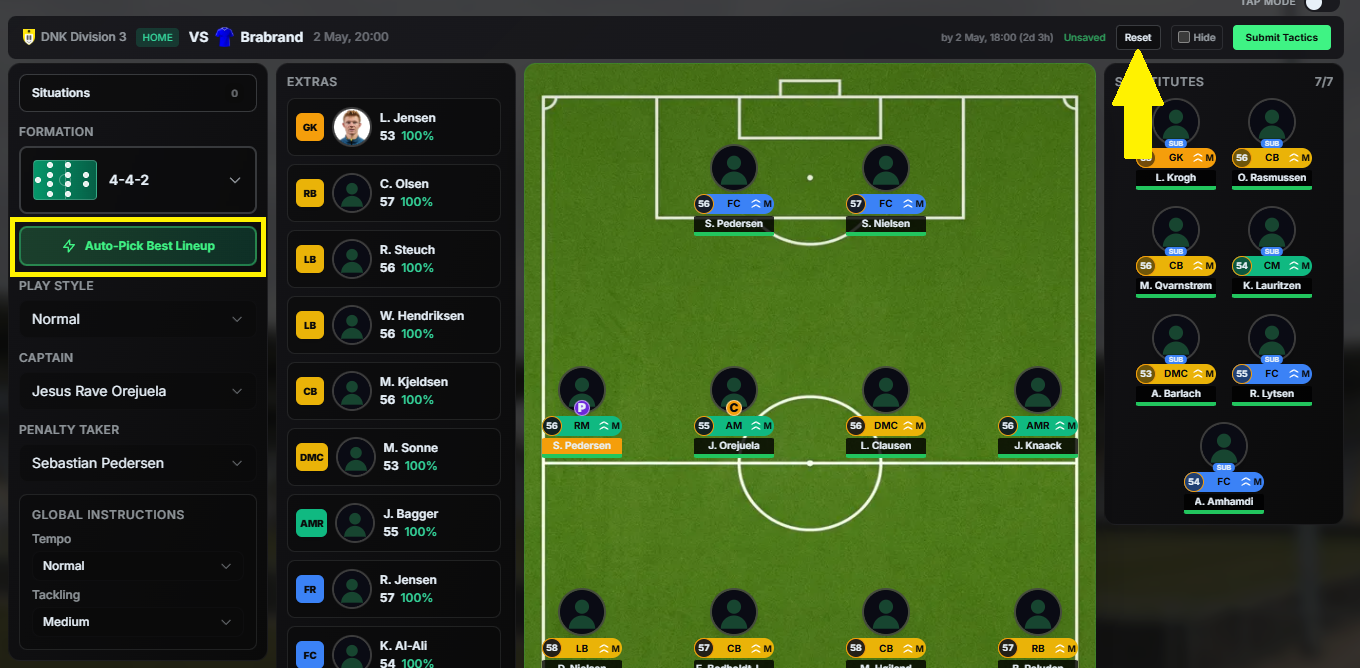
You can use the AUTO-PICK BEST LINEUP button which will create a computer generated tactics for you, but the fun can be had by working it all out on your own by scouting your next opponent and knowing your own players strengths and weaknesses inside out on top of being a tactical mastermind.
Should you, at any point, feel like you have messed things up, use the RESET button to start over.
LINE UP
Line Up is where managers decide who is on the pitch to start, who the substitutes are and who the extra players are that won’t be participating in the match are. It shows:
- Which players are on the pitch and their positions (11)
- Which players are available for substitutions (7)
- Which players aren’t participating in the match (the rest of the club’s players, between 3 and 14 depending on squad size)
To switch players in and out of the line up, drag and drop a player onto another player or activate the TAP MODE for just clicking on the players you want to switch.
The fitness of your players is a major factor in the game, so keep this in mind when picking your players for the next match.
**IMPORTANT NOTE:** Injured and suspended players must be in "EXTRAS", not in "SUBS" or even on the PITCH. Injured and suspended players are indicated by a red cross or red card on your tactics screen and also have a respective indicator in your squads page STATUS column.
Transfer listed players are indicated by a special icon on your tactics screen and with a "TL" in your squads page STATUS column. Be careful with fielding transfer listed players, since they might get sold shortly before the tactics submission deadline or even in the two hours before kick-off, when you can no longer change tactics. If this happens, your tactics will become invalid.
Your tactics won't save if there are injured/suspended players on the subs bench, on the pitch or if transfer listed players who are on pitch or in subs get sold before kick-off. As a consequence you will play with computer generated tactics.
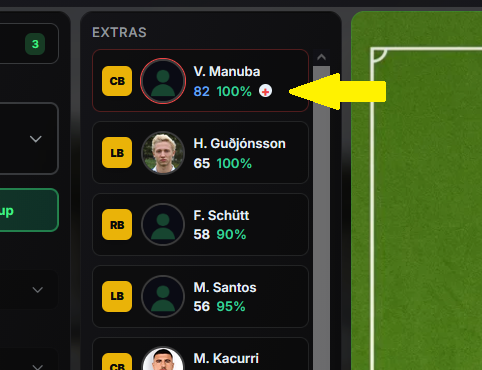
In case of an injury during the game, the player on the bench who fits the position of the injured player the best, will come on the field as replacement.
When an injury happens after you have already used up all your substitutions, you will finish the match one or more men down.
PLAYER POSITIONS
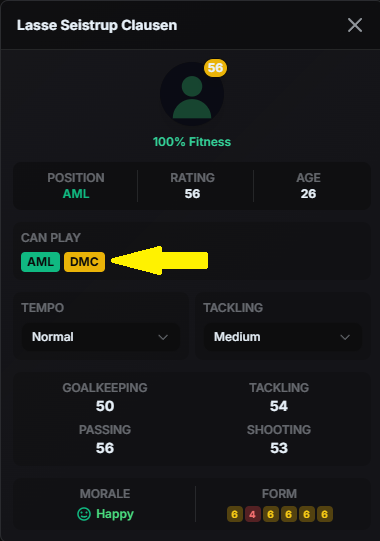
Most of the players can play in different positions; you can check those positions and his other skills by clicking the player in the tactics screen.
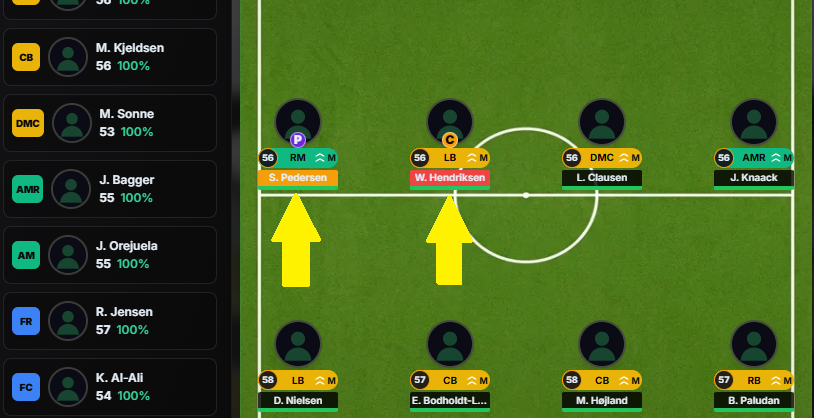
Your player will change colour if you put him out of position, where yellow is slightly out of position, which is still OK, while red is completely out of position, which is generally not desirable.
These are the player positions in Soccerverse:
GOALKEEPERS (orange)
GK = Goalkeeper
DEFENDERS (yellow)
LB = Left-back
CB = Centre-back
RB = Right-back
DML = Defensive midfielder left
DMC = Defensive midfielder centre
DMR = Defensive midfielder right
MIDFIELDERS (green)
LM = Left midfielder
CM = Centre midfielder
RM = Right midfielder
AML = Attacking midfielder left
AM = Attacking midfielder
AMR = Attacking midfielder right
FORWARDS (blue)
FL = Forward left
FC = Forward centre
FR = Forward right
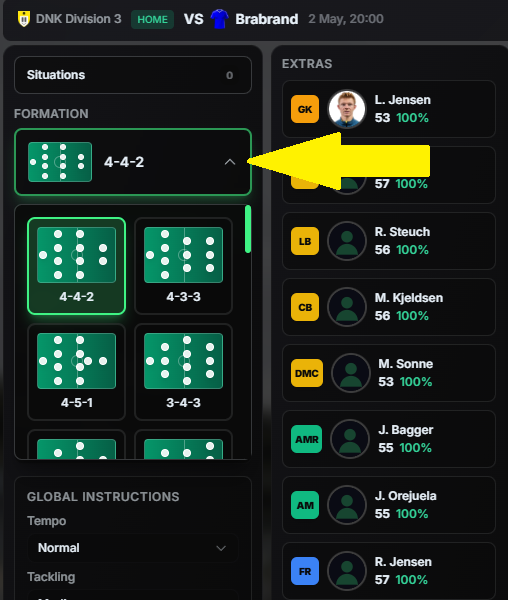
FORMATION
Formations are foundational for setting strategies. There are many to choose from and you might be familiar with most of them from real life football matches.
TEAM INSTRUCTIONS
This is where the particulars of the team’s strategy is determined. There are six different playstyles available: Normal, Defensive, Attacking, Passing, Counter Attack and Long Ball. You can set a Captain, your Penalty Taker and the Tempo and Tackling.
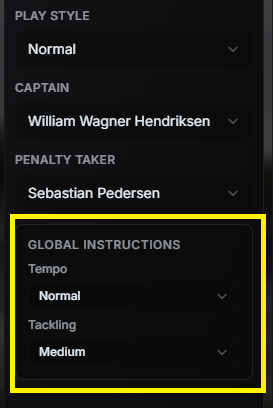
Please note that the TEMPO and TACKLING STYLE instructions in the yellow box above are a shortcut to globally change these parameters for your whole team. This is nothing that will get saved - what matters regarding tempo and tackling style is what is shown next to the players position on the pitch and you can set that for each player individually.
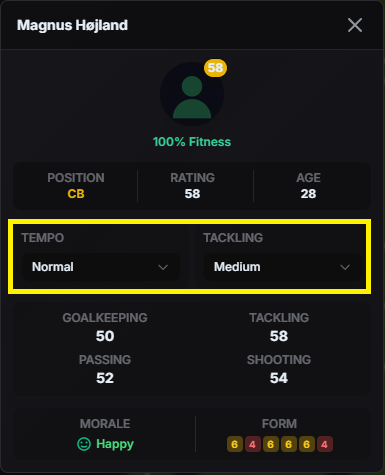
The global settings for a team can be normal tempo and medium tackling style. But if you want your forward to play with a fast tempo and a soft tackling style, that can be achieved by clicking on the player and using the dropdown menu to assign individual instructions.
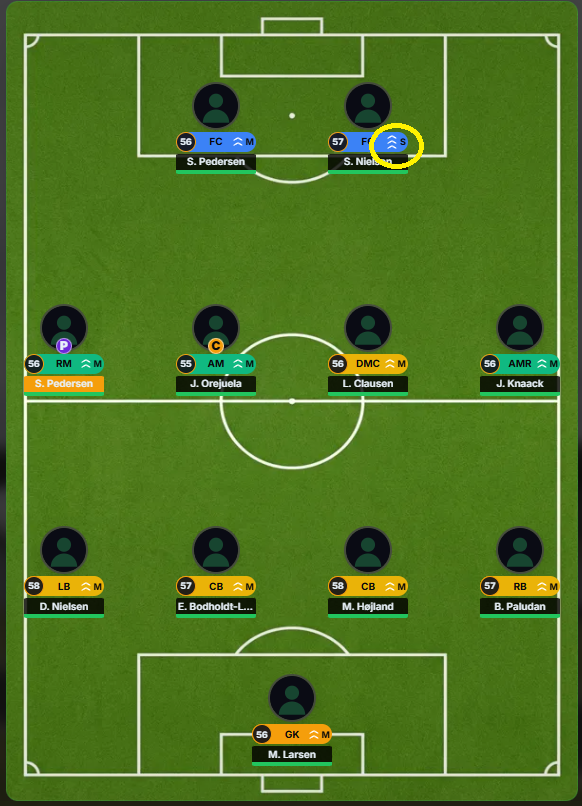
From the screenshot, you can see all of the players having two upward arrows, which means normal tempo, and a "M", which means medium tackling style. But since we set individual instructions for the forward, he now has three upward facing arrows, which means fast tempo, and an "S", which means soft tackling.
1, 2 or 3 upward facing arrows indicate the tempo, where 1 = slow, 2 = normal, 3 = fast.
S, M or H indicate the tackling style, where S = soft, M = medium and H = hard.
SITUATIONS
Situations let you change strategies and substitute players depending on various conditions at any time during the match. To create a situation, click on the SITUATIONS button and then on the CREATE FIRST SITUATION or ADD SITUATION, if you already created a situation previously, in the popup.
In this popup you can also manage your situations by deleting them.
Situations are limited to 8 currently, so don't create more than that.
Try to NOT swap players or change the formation AND do substitutions in the same situation. It will most likely result in the wrong players getting substituted. Create separate situations for formation changes and substitutions.
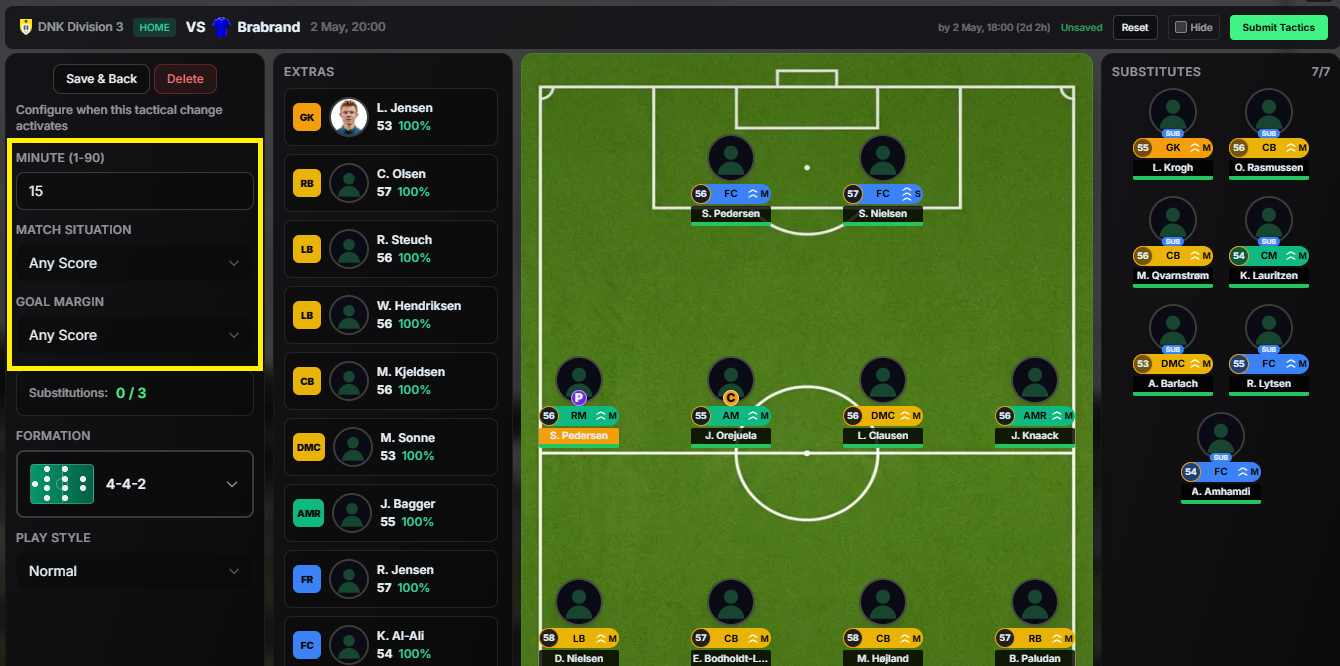
The possibilities here are extensive. Make sure to enter an in-match time for the situation top left, choose a match situation and goal margin for this situation to take effect, and afterwards set your desired changes (formation change, different play style, substitutions, drag players around) for that condition and score. You can make up to three subsitutions per match, but you can set more than these three for the various conditions and situations - not all will get triggered then of course.
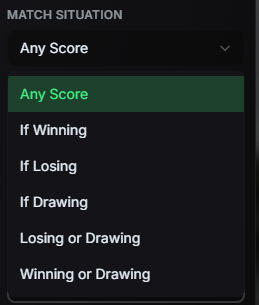
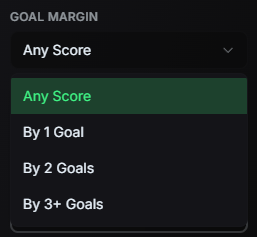
You can leave the situations without saving by just using the DELETE button in case you want to discard any changes.
Once the situations are set, click the SAVE & BACK button. If you want to set an additional situation, you can repeat this process.
HIDE/REVEAL TACTICS
You can find a HIDE button in your tactics screen. By ticking that box and submitting your team sheet afterwards (the "Submit Tactics" button will change to "Hide Tactics" after ticking the hide box), other users will not be able to see your tactics.
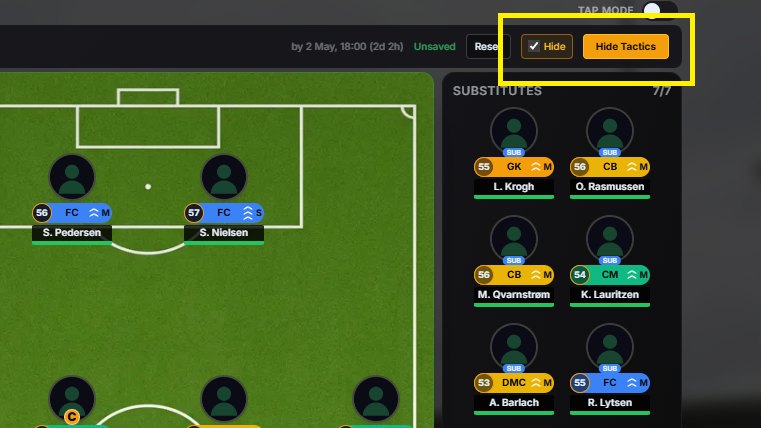
Once that is done, you can, at any time, choose to reveal your tactics by clicking the REVEAL NOW button.
You HAVE to reveal your tactics at kickoff at the latest. If you fail to do that, you will play with computer generated tactics, so don't forget to reveal your tactics in time or choose to not hide your tactics at all.
You can also choose to let the Soccerverse team automatically reveal your tactics for you by clicking AUTO-REVEAL BEFORE MATCH. Your tactics will then get revealed one hour before the match and you don't have to worry about revealing your tactics in time.
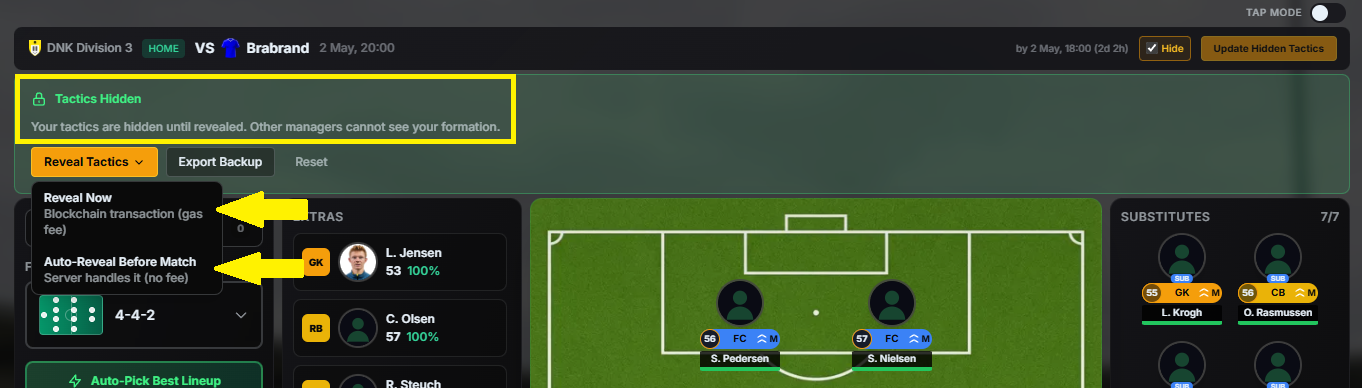
A warning is displayed if you are yet to reveal your tactics.
You can change your tactics as often as you want until the two hours before kick-off deadline.
KICK-OFF TIMES
These are the kick-off times in Soccerverse (daylight saving applies where applicable):
- Kick-off for league matches is at 7pm in the countries local time. If it's a country with multiple time zones, it is 7pm of the most important city.
- Kick-off for national cup matches is at 7pm in the countries local time. If it's a country with multiple time zones, it is 7pm of the most important city.
- Kick-off for Champions League matches is at 9pm based on the time zone that lies approximately in the middle of the continent.
- Kick-off for Club World Cup matches is at 9pm UTC.